Believe it or not, there is an influx of people who strongly believe that sharing their email address in their bio is completely harmless. But let me tell you something: if you’d like to be impersonated by scammers, have your password reset, or your identity stolen, feel free to share it! And yes, they can still harm you even without your password.
In this article, we are going to explain:
- What scammers actually do with your email
- How much information they can learn about you
- How to protect yourself, including how to set up a private contact email on brandID step by step
Key Takeaways
- No password needed. With just your email, scammers can phish you, trigger password resets, impersonate you, and sell your address to data brokers.
- Your bio is the biggest leak. An email posted publicly is easy for bots to scrape and for scammers to target.
- Hide it, do not remove it. brandID’s Email Me puts a secure contact form in front of your inbox, so people can still reach you.
- Setup takes about two minutes. Add the Email Me card, pick the fields senders must fill in, enter your private email, and share your link.
- Lock the basics too. A unique password and two-factor authentication stop most account takeovers.
Why Your Email Address Is More Valuable Than You Think
As I mentioned earlier, your email address is far more than a simple username. Think about it for a second: your bank accounts, shopping accounts, social profiles, and business tools are often tied to that email, right?
That means if your email and password get leaked, all your potential assets could be at risk of being hijacked by hackers. Once someone has your email address, they can:
- Look up other accounts linked to it
- Request password resets
- Send messages pretending to be you
- Target you with convincing scams
Pro tip: This is exactly why creators should regularly use an Instagram Audit Tool to check for suspicious activity, sudden audience drops, or unusual engagement patterns.
What Can Someone Do With Your Email Address?
We, as regular users, often use our email addresses for various tasks such as signing up for new websites, online shopping, creating social media profiles, or joining communities and forums. The harsh reality is that we share our email addresses freely without a second thought, not realizing the potential consequences this could bring.
What I’m trying to emphasize is that by sharing your email address carelessly, you increase the risk of cybercriminals misusing it in many ways, from phishing attacks to identity theft. By understanding how hackers can exploit email addresses and taking proactive security measures, you can better safeguard your personal information and minimize the risk of misuse.
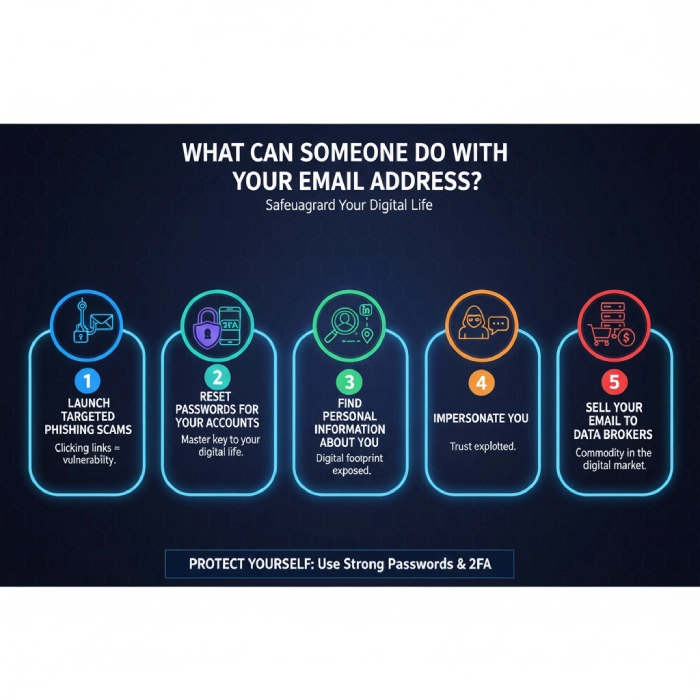
Launch Targeted Phishing Scams
Did you know a single email can open the door to a scam?
Ever clicked a link that looked urgent or official? That’s how they get you, by turning curiosity into vulnerability before you even realize what’s happening.
With just your email, scammers can send messages that look like they’re from a bank, store, or friend. Those emails try to trick you into clicking links or typing passwords so the scammer can steal your personal information.
Reset Passwords For Your Accounts
Your email is like the master key to your online accounts. If someone gets into your email, they can use “Forgot Password” links to reset and take over your other accounts. This is why using a strong password and turning on Two-Factor Authentication (2FA) is so important: it adds an extra lock to keep hackers out.
Find Personal Information About You
Your email address can help people find out more about you, like your full name, where you work, or your social media profiles. This information can be used to guess passwords or trick you.
Impersonate You
In the context of cybersecurity, impersonation refers to a person (hacker) who acts like a wolf in sheep’s clothing and tries to pass themselves off as a trusted contact. In other words, they pretend to be you by exploiting publicly available information under false pretenses.
Even small bits of personal data can be dangerous if they fall into the wrong hands, including details like your profile picture, email address, and name.
We usually tend to let our guard down when we encounter familiar names and images, don’t we? That’s exactly what makes impersonation so effective. Hackers can appear out of thin air once they gain access to your publicly available information.
You have no idea how many times I’ve come across people who said they were caught off guard by messages that seemed genuine simply because familiarity creates a false sense of security. To be on the safe side, you’d better be more cautious about your personal details.
Sell Your Email To Data Brokers
Did you know your email address can be bought and resold like a commodity? Have you ever been surprised by the sheer volume of spam or intrusive advertisements landing in your inbox?
The reality is, there are companies known as data brokers that specialize in collecting huge lists of email addresses and turning a profit by selling them to advertisers, marketers, and even spammers. Once your email address ends up in one of these massive databases, you’re exposed and will likely experience an avalanche of unwanted messages.
Data brokers source your email address from a variety of places: public records, online purchases, loyalty programs, and even social media profiles.
How brandID Solves These Email Privacy Risks
Essentially, brandID is a link in bio tool that gives creators a central hub for all their links and content in one single link. With its monetization features, brandID helps creators earn from their audience with a digital store of their own to sell digital products, promote affiliate products, sell subscriptions, and more.
brandID’s Email Me feature offers a private, secure contact form that you can place anywhere online. Instead of exposing your real email address to the world, visitors see a simple button such as “Email Me”. When someone clicks it, they fill out a secure form that sends their message to you, without ever revealing your actual email address.
This feature is extremely useful for influencers, creators, coaches, freelancers, and business owners who want to protect their privacy while keeping communication easy.
| Email In Your Bio | brandID Email Me | |
|---|---|---|
| Your address visible to everyone | Yes | No, always hidden |
| Scraped by bots and spam lists | Easily | No, messages go through a secure form |
| Control over who can message you | None | You choose the required fields |
| Phishing target | High risk | Much lower, your address is never shown |
| Organized contacts | Scattered in your inbox | Every sender saved in your brandID CRM |
| Reply from your own inbox | Yes, and it reveals your address | Yes, and your address stays private |
How To Set Up Your Private Contact Email On brandID (Step-By-Step)
Setting up Email Me takes about two minutes, and you only do it once. You need a free brandID account and the email address where you want to receive messages. Here is the full process, from sign-up to your first private reply.
Sign Up And Open Your Dashboard
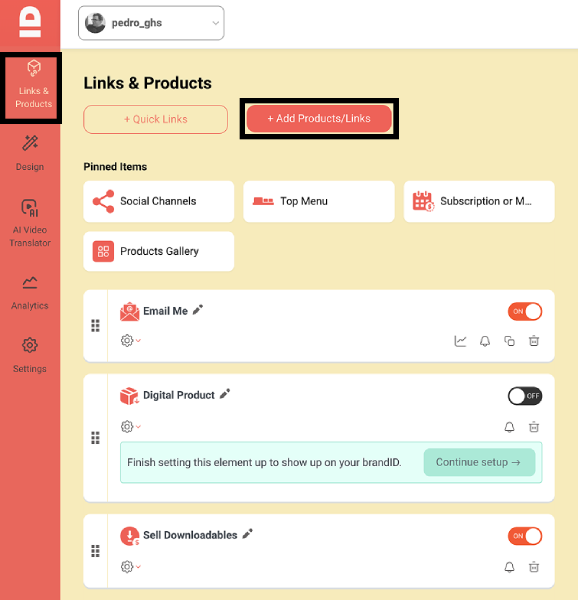
Create your free brandID account, then open your dashboard and go to Links & Products. Click Add Products/Links. This is your control center: everything on your link in bio page is added and arranged here.
Add The Email Me Card
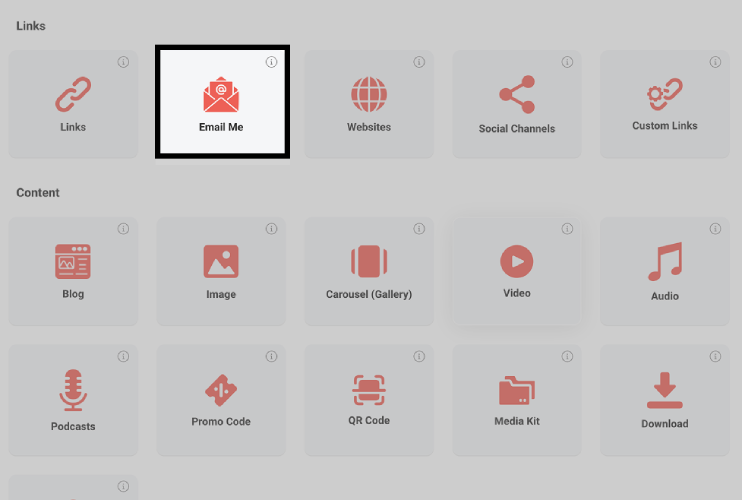
From the content menu, choose Email Me. This adds a private contact module to your link list. Visitors will see a contact button on your page, never your inbox or your address.
Choose What Senders Must Fill In
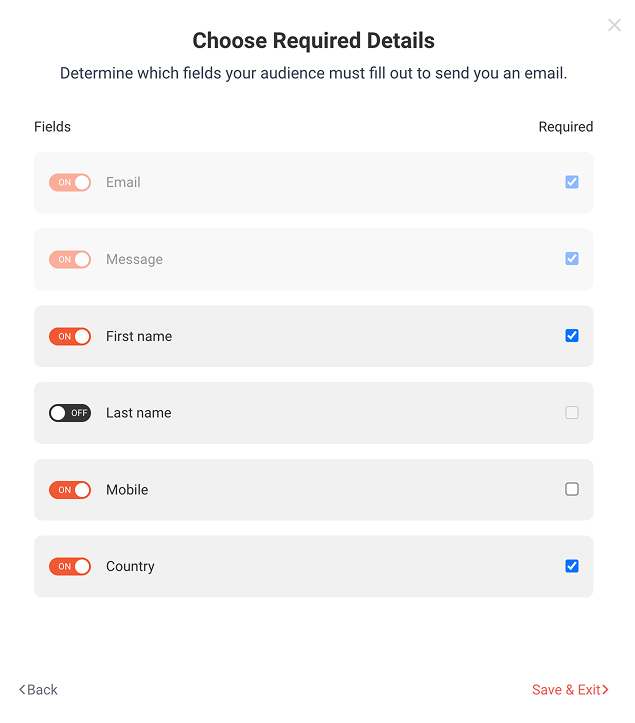
Toggle the fields people must complete before they can send you a message. Email is always required, and you can add Message, First Name, Country, Mobile, and more. Requiring a few details filters out bots and low-effort messages, so the ones that reach you are worth reading.
Enter Your Private Email And Customize The Button
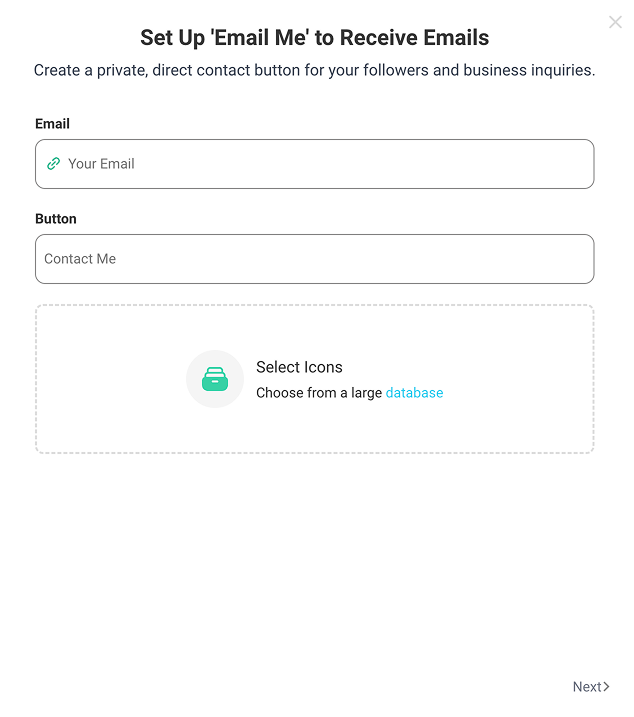
Type the private email address where brandID should forward messages. This is your real inbox, and it is never shown to visitors. Then customize the button text, for example “Work With Me” or “Book A Collab”, and pick an icon that fits your brand.
Publish And Share Your Link
Save the card, and your Email Me button goes live on your brandID page. Drag it to the top of your link list if brand deals matter most, then put your brandID link in your Instagram, TikTok, YouTube, and X bios, your email signature, or anywhere you used to post your address.
Receive And Reply Without Revealing Your Address
When someone taps your button, they fill in your form and the message lands in your regular inbox. Reply from your own email app as usual, and brandID delivers your reply to the sender while your private address stays hidden. Every sender is also saved in your brandID CRM, so you can follow up on deals or share future offers.
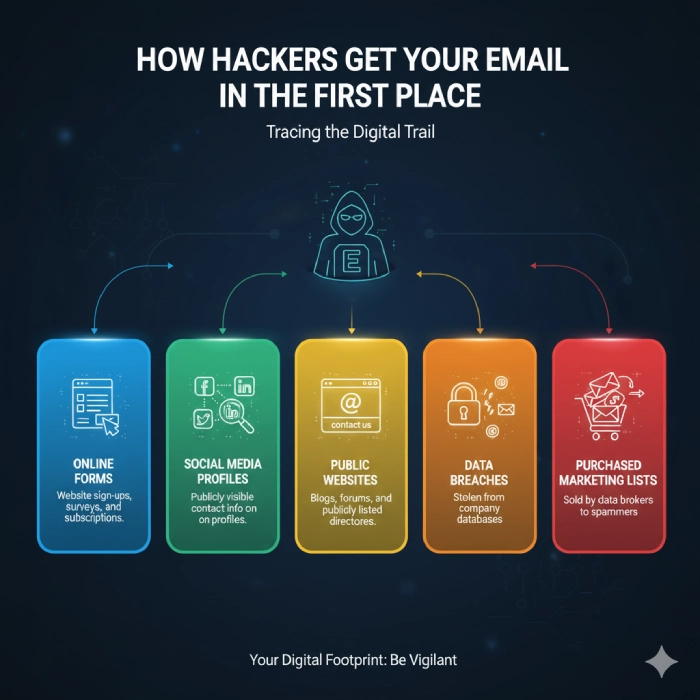
How Hackers Get Your Email In The First Place
- Online forms
- Social media profiles
- Public websites
- Data breaches
- Purchased marketing lists
How To Protect Your Email Without Compromising (Extra Steps)
Use a strong, unique password for your email and avoid reusing it anywhere else. Turn on Two-Factor Authentication (2FA) so even if someone gets your password, they still can’t get in. Be careful with links and messages you open, and don’t share your email on untrusted websites.
The good news is, you can maintain your online presence while protecting your email privacy:
- Use a strong, unique password that you don’t reuse on any other site.
- Enable Two-Factor Authentication (2FA) using an authenticator app (not SMS if possible).
- Avoid clicking suspicious links or email attachments, since they may try to steal your login info.
- Don’t share your email on public or untrusted websites to reduce spam and phishing risks.
- Check your account recovery settings and remove old phone numbers or backup emails you don’t use.
- Regularly review connected apps and devices and sign out of anything you don’t recognize.
- Use privacy tools like Email Me on brandID to share your contact securely without exposing your actual email.
Conclusion
Your email address is much more than just a login ID. It’s a key that can unlock access to your personal and professional life. As we’ve discussed, scammers can exploit your email to launch phishing scams, reset passwords, impersonate you, and sell your data, all without needing your password. Protecting your email privacy is essential in today’s digital world to avoid these risks and keep control over your online identity.
Thankfully, tools like brandID’s Email Me feature offer a simple yet powerful way to keep your real email hidden while staying connected with your audience. By using a secure contact form, creators, influencers, and business owners can communicate safely without exposing themselves to spam or cyberattacks.
Sign up for brandID now and safeguard your digital presence with one secure link.
Frequently Asked Questions
What can someone do with my email address without password?
Is it dangerous to give out your email address?
Can hackers access my accounts with only my email?
Is it safe to use the same email for multiple accounts?
How do I share a contact email on Instagram without showing my address?
 Summarize this article with: