

Almost everybody who searches what does highlighted comment mean on YouTube is quietly hoping it means something good. That the creator noticed them, or that YouTube picked their comment out of thousands.
It means neither. A highlighted comment is a bookmark YouTube made for you, visible only to you, because you arrived at that comment through a link rather than by scrolling.
The confusion is entirely the fault of one word. Nothing was highlighted in the sense of being singled out for praise. It was highlighted in the sense of being made findable.
Below is what triggers it, why nobody else can see it, how it differs from a pinned comment, and the genuinely useful thing you can do with it once you understand the mechanism. If you are building a channel, how many subscribers you need to make money on YouTube covers the part that does matter.
Key Takeaways
Key Takeaways
- A highlighted comment is visible only to you. Nobody else sees the label, including the creator and the person who wrote it
- Nobody highlights it. There is no button, no creator action and no algorithm choosing comments. It is automatic
- It appears when you arrive by link, usually from a notification, an email, or a comment timestamp
- It disappears on refresh or as soon as you load the video normally
- It gives no boost of any kind. No extra visibility, no ranking benefit, no notification to anyone
- Pinned is the public version. That one is chosen by the creator and everybody sees it
- The URL is the useful part, since a comment link lets you send somebody straight to a specific comment
What Is a Highlighted Comment on YouTube?
A highlighted comment is a temporary label YouTube places above a specific comment so you can find it. It reads Highlighted comment in small light-grey text directly above the commenter’s name.
The visual difference from a pinned comment is easy to miss. A pinned comment carries a thumbtack icon and the words Pinned by, followed by the channel name. A highlighted one has no icon at all, just the plain grey label.
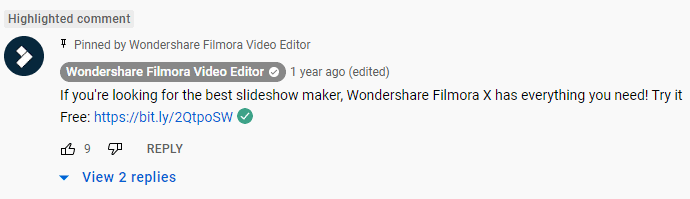
It exists for one reason: you followed a link to that comment. YouTube loads the video, scrolls to the comment, and marks it so you know which one brought you there.
The label is personal to your session. If a thousand people watch the same video at the same moment, none of them see the highlight you are looking at.
Why Is My Comment Highlighted on YouTube?
Three things trigger it, and all of them are something you did rather than something done to you.
- You clicked a notification. Someone replied to you or commented on your video, and tapping the alert takes you straight to it.
- You clicked an email notification. YouTube’s email alerts contain the same direct comment link.
- You clicked a comment timestamp. Selecting the posted-at time on any comment generates a direct link to it and reloads the page with the highlight applied.
You can confirm it in the address bar. A highlighted comment adds a parameter beginning with lc followed by a long alphanumeric string, which is the comment’s unique identifier.
Load the video without that parameter and the highlight is gone. That is the whole mechanism.
Who Highlights Comments on YouTube?
Nobody. This is the part worth being blunt about, because it is the assumption behind most of the searches.
There is no highlight button for creators, no moderator tool, and no algorithm selecting comments for recognition. YouTube applies the label automatically when a link is followed, and removes it when you navigate normally.
If a creator wants to single out a comment publicly, they pin it. That is a deliberate action, it is permanent until changed, and everybody sees it.
💡 The quickest way to prove it to yourself:
Open a video, click any comment’s timestamp, and watch the label appear above a stranger’s comment you have never interacted with. Nothing happened to that comment. You just arrived at it through a link.
Highlighted vs Pinned vs Top Comments
Three different things that all appear near the top of a comment section, which is why they get confused.
| Highlighted comment | Pinned comment | Top comments | |
|---|---|---|---|
| Who sees it | Only you | Everyone | Everyone |
| Who decides | Nobody, it is automatic | The video’s creator | YouTube’s ranking system |
| What triggers it | Following a link to the comment | Creator selects Pin | Likes, replies and engagement |
| How long it lasts | Until you refresh or navigate away | Until the creator pins another | Changes as engagement changes |
| Visibility benefit | None whatsoever | Substantial, it sits at the top | Substantial |
| Notification sent | No | Yes, the commenter is notified | No |
What Are Highlighted Replies on YouTube?
Exactly the same feature, applied to a reply rather than a top-level comment. The label reads Highlighted reply instead.
It is the version creators see most often, because replies to their comments generate notifications, and tapping those notifications is the most common way anyone encounters this label at all.
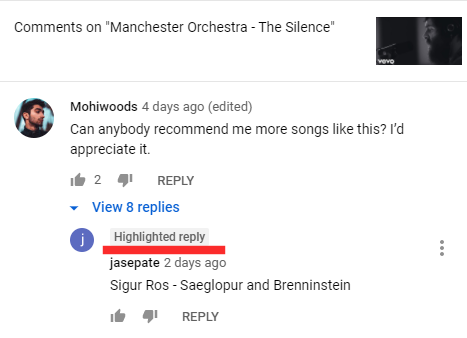
Everything else holds. It is private, temporary, automatic, and carries no benefit.
How Does a Comment Get Highlighted on YouTube?
You can trigger it deliberately, and this is the one genuinely useful thing in this article.
- 1- Find the comment you want to reference on any video, yours or somebody else’s.
- 2- Click the timestamp next to the username showing when it was posted.
- 3- The page reloads with that comment moved to the top and labeled as highlighted.
- 4- Copy the URL from the address bar. It now contains the comment identifier.
- 5- Send it to anyone. Opening that link takes them directly to the comment, highlighted for them too.
Alternatively, use the three-dot menu on any comment and select the share option, which copies the same link without reloading the page.
This is how you point somebody at one comment in a thread of forty thousand. It is a navigation tool, which is what the feature was always for.
Is a Highlighted Comment Good or Bad?
Neither, and that is the honest answer rather than a hedge. It is a neutral navigation aid with no reputational meaning attached in either direction.
It does not indicate approval from the creator, popularity among viewers, or a policy problem with what you wrote. Plenty of people see the label and assume they have been flagged for something. They have not.
The closest useful framing is that it works like a pinned comment that is temporary and exclusive to you. Same position at the top, none of the meaning.
Does a Highlighted Comment Help Your Channel?
No, and it is worth being clear about that because a lot of advice implies otherwise.
The label sends no notification, changes no ranking, and reaches no additional viewer. YouTube’s comment ordering is unaffected by it, and the creator’s dashboard shows nothing different.
A comment that got highlighted is a comment you clicked a link to. That is the entire event.
What Actually Gets a Comment Noticed
If the underlying goal was visibility, these are the things that genuinely produce it.
- Comment early. Comments on a video in its first hour accumulate the likes that push them into the top comments, which is the ranking that actually exists.
- Say something specific. Generic praise gets scrolled past. A precise observation, a correction, or a question the video did not answer earns replies.
- Answer other people. Replying usefully within a thread gets you seen by everybody following it, and creators notice consistent commenters.
- Ask something the creator wants to answer. A question that gives them an excuse to expand on their subject often earns a reply, which is worth more than any label.
- Skip the self-promotion. Comments advertising your own channel are the fastest route to being ignored and frequently removed.
- Show up repeatedly on the same channels. Recognition compounds, and regular commenters get replies that first-time visitors do not.
For creators reading this from the other side, the comment section is the cheapest audience research available. The questions repeating in your comments are your next several videos, and they are also what makes getting sponsors on YouTube easier, since engaged comments are evidence of an audience that listens.
Comment Labels Creators See That Viewers Do Not
If you run a channel, several other states appear in YouTube Studio that get mistaken for this one.
| Label or state | What it means | Who sees it |
|---|---|---|
| Highlighted comment | You followed a link to it | Only you |
| Pinned by creator | The creator selected it deliberately | Everyone |
| Held for review | Caught by a filter and awaiting approval | Only the creator and the author |
| Likely spam | Automatically sorted into a separate tab | Only the creator |
| Creator heart | The creator tapped the heart icon | Everyone |
| Channel owner reply | A reply from the channel, badged automatically | Everyone |
Held for review is the one that causes genuine confusion, because a commenter sees their own comment normally while nobody else can. If somebody insists they commented and you cannot find it, check that tab before assuming they are wrong.
Turning Comment Engagement Into Something
A comment section full of questions is a signal that people want more from you than the video gave them. The gap between that and any income is a link.
That link is normally the one in your channel description or a pinned comment, and it is doing more work than any other element on the page. Options are compared in the best link in bio tools.
brandID turns the single link in your channel description or pinned comment into a page holding everything you offer, rather than one destination chosen in advance.
- One page for everything you mention across your videos, so a viewer arriving from any comment finds the right thing.
- Sell your own work through digital products, subscriptions and tipping, without waiting for monetization thresholds.
- Earn commission on products you recommend, through a marketplace of over 5 million products from more than 2,000 brands, which pairs naturally with YouTube affiliate programs.
- Capture emails, so the people who engage are reachable without depending on YouTube’s notifications.
- Free plan available, with creators keeping 95% of every sale on the free plan and 100% on any paid plan using their own gateway.
Conclusion
A highlighted comment means you clicked a link. It is a bookmark, it lasts until you refresh, and you are the only person in the world who can see it.
The word does all the damage. Highlighted sounds like selected, and it is a long way from it. Pinned is the label that means somebody chose you.
What the feature is genuinely good for is pointing someone at one comment among thousands. Click a timestamp, copy the URL, send it. That is the useful half, and almost nobody uses it.
Frequently Asked Questions
What Does Highlighted Comment Mean on YouTube?
The label is visible only to you and disappears when you refresh the page or open the video normally. It carries no ranking benefit and nobody is notified.
Who Highlights Comments on YouTube?
The action people usually have in mind is pinning, which is a deliberate creator choice, permanent until changed, and visible to everyone.
Why Is My Comment Highlighted on YouTube?
You can confirm it in the address bar, where the URL will contain a comment identifier beginning with lc. Remove that parameter and the highlight disappears.
Can Other People See My Highlighted Comment?
If you share the URL created by clicking the comment’s timestamp, whoever opens it will see the same comment highlighted, because they have now followed the same link you did.
What Is a Highlighted Reply on YouTube?
It behaves identically: private to you, temporary, automatic, and with no effect on visibility or ranking.
How Does a Comment Get Highlighted on YouTube?
You can also use the three-dot menu on a comment and choose the share option, which copies the same link without reloading the page.
What Is the Difference Between Highlighted and Pinned Comments?
A highlighted comment is automatic, temporary, and visible only to the person who followed the link. Pinning is recognition; highlighting is navigation.
Does a Highlighted Comment Mean the Creator Saw It?
The one case where it does suggest attention is if you received a notification that the creator replied to you. In that instance the reply is the evidence, not the highlight.
How Do I Remove a Highlighted Comment Label?
There is nothing to switch off, since the label is not a setting and is not stored anywhere on your account.
Does Being Highlighted Boost a Comment’s Visibility?
Comment visibility on YouTube is driven by likes, replies and how early the comment was posted, which is what determines the top comments everyone actually sees.
Is a Highlighted Comment on YouTube Good or Bad?
People frequently assume the label means they have been flagged for something. It only means a link to that comment was opened, which is usually something they did themselves.
What Does a Highlighted Comment Look Like?
That distinguishes it from a pinned comment, which shows a thumbtack icon along with the words Pinned by and the channel name. If you see a thumbtack, the creator chose that comment deliberately.
 Summarize this article with:









