
If you want to scale B2B email marketing in 2026, choosing the best cold email software is critical. The right platform doesn’t just automate outreach — it improves deliverability, protects your sender reputation, and turns cold prospecting into a predictable growth channel. In fact, marketers who use sales automation and cold outreach tools see up to 320% higher revenue growth than those relying on manual email processes.
With stricter spam filters and crowded inboxes, traditional cold email tactics are becoming less reliable. Businesses now need smarter outreach tools that combine automation, personalization, and alternative sending methods to consistently reach decision-makers.
Here, we compare the 5 best cold email software and outreach tools in 2026, breaking down their features, pricing, and scalability so you can choose the right solution to generate more replies, meetings, and sales.
1- Bulk Cold Outreach with AI Contact Us Form Submission- brandID
brandID is one of the best cold email software solutions for B2B businesses, especially for teams looking to move beyond traditional outreach. Instead of sending emails the usual way, brandID introduces a newer method of B2B email marketing: delivering personalized messages directly through companies’ website “Contact Us” forms. Powered by advanced contact form automation, this system enables human-like submissions at scale without relying on traditional inbox sending.
This approach bypasses common cold email limitations such as spam filters, domain warm-ups, and high bounce rates. By submitting outreach emails through official website forms, your pitch reaches the company’s primary business inbox or CRM — where business owners and decision-makers actually expect to receive inquiries and partnership requests.
For B2B marketers focused on scale, deliverability, and performance, this alternative outreach system provides a more reliable, scalable way to generate conversations and drive sales.
💡If you are interested in how to use this extension visually, watch this quick tutorial video below:
Key Features of the brandID Bulk Cold Outreach Extension
brandID doesn’t just automate outreach — it reinvents it. Here are the high-performance features that make it a smarter, more scalable alternative to traditional cold email software.
- Auto Captcha Solver: Some websites ask you to prove you’re not a robot. brandID uses AI to solve CAPTCHA, so your form submissions can continue automatically at scale without interruption.
- Delivers Pitches through Contact Us forms: Instead of sending a cold email, brandID sends your message through each website’s Contact Us form. This direct, high-intent channel in contact form marketing helps your message reach the company’s main inbox or CRM, where key business owners and decision-makers expect to receive business questions or requests.
- Sends at High Volume (10,000–20,000 per day): Submit thousands of contact forms with a single click. This extension is designed for large-scale outbound outreach without much manual work.
- Pay-Per-Success Monetization Model: You pay only when a form is successfully submitted. If your contact form submission fails, you do not get charged.
- Website List Cleaning: The extension cleans your imported list of target websites by removing invalid websites that lack a “contact us” form.
- A/B Testing for Contact Form Message Optimization: With the extension, you can test two versions of a message and see which performs better in your contact form marketing campaign. Then you can keep using the message that performs best.
- Complete Management & Control over Contact Form Marketing: Track everything in one dashboard. See which websites are queued for auto submission, which submissions were successful, and which ones failed. Export any status list as CSV or TXT, or remove entries to prevent accidental resends.
- Send Customized Messages: You can create multiple agent profiles and set a percentage distribution for each profile to be sent in each list.
- Auto Language Detection: brandID detects the website’s language and fills out the form accordingly. This human-like form submission makes your outreach feel more natural.
- Online Customer Support: Get help 24/7 with any questions or issues.
brandID’s Bulk Cold Outreach Extension (Pros & Cons)
Now, let’s explore its key advantages as one of the best Chrome extensions for lead generation in B2B email outreach!
Pros
- Automates and scales contact‑form outreach workflow.
- Detects contact forms on websites and automatically solves CAPTCHA.
- Reaches prospects via website forms to avoid inbox spam filters.
- Charges only for successful contact form submissions (pay‑per‑success monetization model).
- Cleans lists and tracks performance with simple, actionable analytics.
- Personalizes outreach by sending customized, human-like emails.
- Auto‑detects each site’s language and submits forms in the native language.
- Skips email warm‑up, domain setup, and inbox saturation.
- Gives complete control and management over contact form marketing campaigns.
- Provides 24/7 online customer support.
Cons
- The extension is designed for B2B, company‑level, not personal outreach.
brandID’s Bulk Cold Outreach Extension Pricing
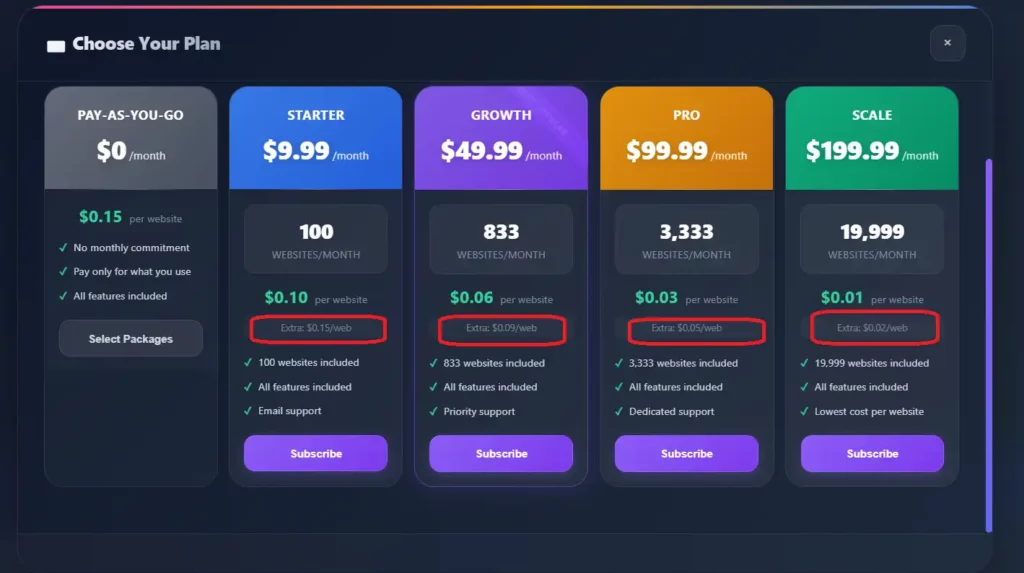
Users initially receive 30 free credits to test this AI outreach tool. Then, you can pick a monthly package: Starter ($9.99, 100 sites), Growth ($49.99, 833), Pro ($99.99, 3,333), or Scale ($199.99, 19,999). If you use all your monthly credits before your billing cycle ends, your outreach won’t stop. You can purchase Extra credits to continue submitting more websites immediately. Those extra submissions are charged at the “Extra: $X/web” rate shown under your plan.
Pay-as-you-go means no monthly subscription: buy a credit pack and spend credits only when you submit forms. Each website costs $0.15. Pick a pack (e.g., $10=66 sites, $25 = 200, $200 = 1,600) and get bonus credits on larger packs. Need more? Top up anytime, or choose Custom (min $10) for a +25% bonus.
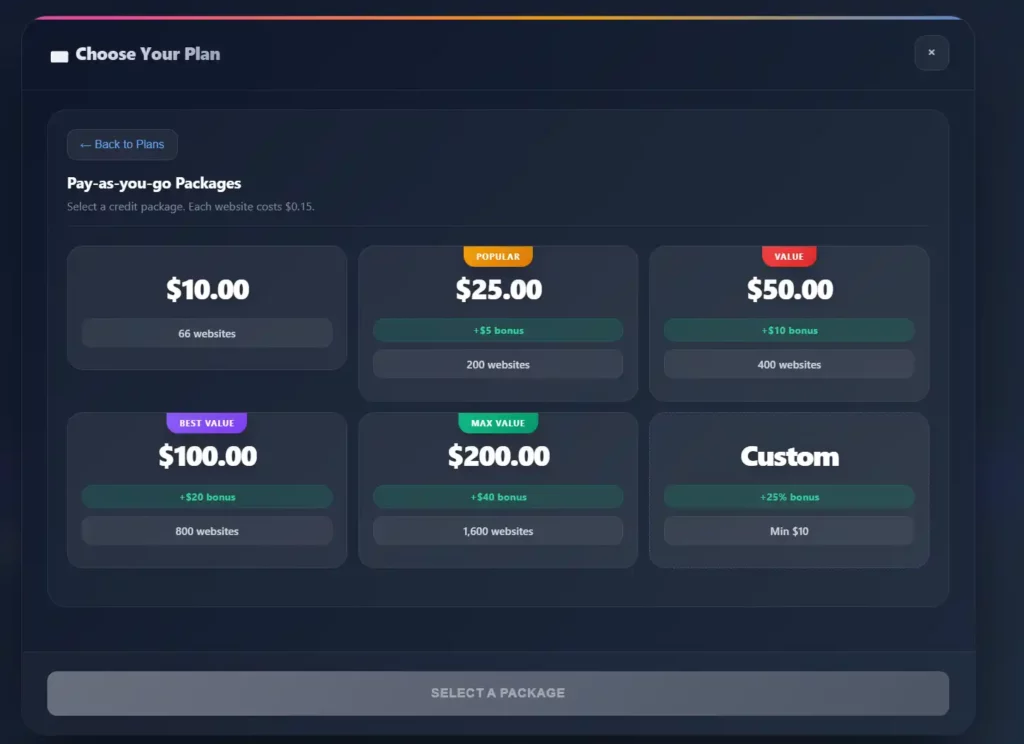
💡Note: With brandID’s bulk Contact Us extension, you can choose a monthly plan, pay-as-you-go, or a custom package—so you only pay for the outreach volume you actually need. This flexibility makes it easy to scale your cold outreach campaign up or down based on your budget or marketing goals.
2- Instantly.ai
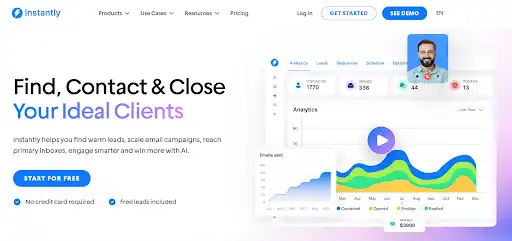
Instantly.ai is a simple tool that helps you send cold emails and keep everything in one place. You can connect as many email accounts as you want, warm them up, and build step-by-step email sequences fast. Its AI writer helps you create messages that match your offer and tone. It also helps your emails reach the inbox rather than the spam folder. Plus, it tracks replies, contacts, and results in a built-in CRM—so it’s one of the best cold email software choices for easy, scalable cold email automation.
To use the Instantly.ai email outreach tool, follow the steps below:
- Log in and click Email Accounts.
- Next, add your email accounts (connect Google/Microsoft, or buy done-for-you or pre-warmed accounts). Turn on Warmup.
- Then, set a daily sending limit (around 30 emails per inbox). Keep tracking low to help your emails land in the inbox.
- Now, set up Copilot → Memory. Add your website, what you sell, social proof (results), and simple writing rules.
- Build a lead list in Supersearch using filters like job title, industry, and location.
- Then create a Campaign, add your verified leads, and draft your email sequence (subject line, body, and follow-ups).
- Finally, select your schedule, choose which accounts to send from, and manage replies in UniBox (or use a Reply Agent). Check Analytics each week to improve.
Instantly.ai Key Features
Instantly.ai is a cold email tool that sends, tracks, and manages outreach in one place. Here are its main features:
- AI Sequence Generator: Writes a full email sequence (first email + follow-ups) based on what you sell.
- Inbox Rotation: Sends emails from different email accounts so you don’t overload one account.
- SuperSearch Leads: Helps you find people to email faster.
- Email Verification and Enrichment: Checks email addresses to reduce bounces and adds additional contact information.
- Unified Inbox (UniBox): Lets you read, tag, and reply to every conversation in one inbox.
- AI Inbox Manager + AI Reply Agent: Sorts replies and drafts or sends responses.
- CRM + Automation Integrations: Integrates with tools like HubSpot, Salesforce, Zapier/Make, and APIs.
Instantly.ai Pros & Cons
In this section, we will take a closer look at Instantly.ai, one of the best cold email outreach tools that simplifies and manages cold email campaigns.
Pros
- Everything is in one place: find leads, send emails, and handle replies.
- You can add multiple email accounts and warm them up to send more securely.
- Built-in deliverability tools (warmup + rotation) improve inbox placement and protect your sender reputation.
- SuperSearch can help you find a list of leads and verify email addresses to reduce bounces.
- AI tools can sort replies and help you respond faster (or even reply for you).
- It integrates with tools like HubSpot, Salesforce, Zapier/Make, and APIs.
Cons
- Low-cost plans can have limits, so sending more may cost more.
- Finding and enriching leads uses credits, which can add extra costs.
- Some advanced setups can be confusing and have a difficult learning curve.
Instantly.ai Pricing
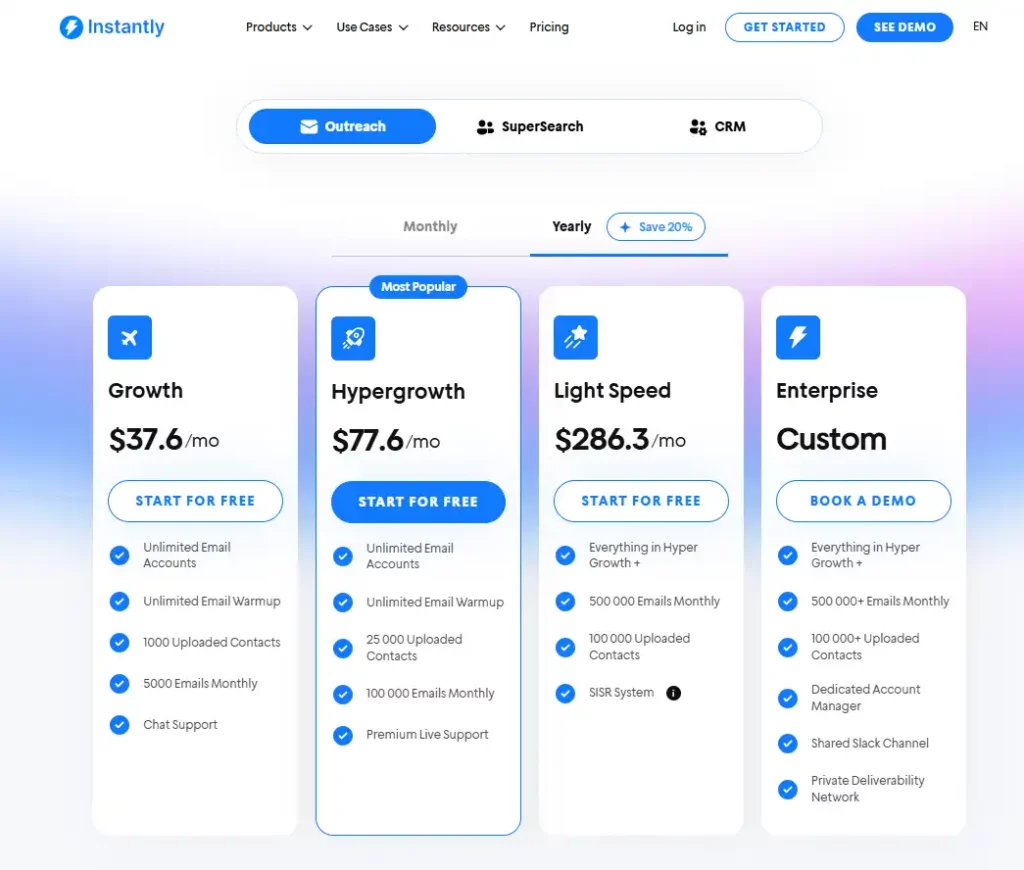
Instantly.ai offers monthly or yearly pricing plans. If you pay yearly, you save about 20%.
All Outreach plans include unlimited email accounts and unlimited warmup. The main difference is how many contacts you can upload and how many emails you can send each month. This email outreach tool pricing plans include:
- Growth ($37.6/month on yearly): 1,000 contacts + 5,000 emails/month.
- Hypergrowth ($77.6/month): 25,000 contacts + 100,000 emails/month, plus better support.
- Light Speed ($286.3/month): 100,000 contacts + 500,000 emails/month, plus SISR deliverability (Server & IP Sharding and Rotation—Instantly rotates server/IP pools to protect inbox placement).
- Enterprise (custom): 500,000+ emails/month and 100,000+ contacts, with extra help like an account manager and a private deliverability network.
3- Gmass
GMass is a helpful email outreach tool that transforms your Gmail into a powerful cold email marketing platform. After installing its Chrome extension, you can send personalized emails from a Google Sheet, schedule automated follow-ups, and test different versions to see what works best. Features like Spam Solver and SMTP routing help keep your messages out of spam and into inboxes, while providing a simple, user-friendly dashboard experience.
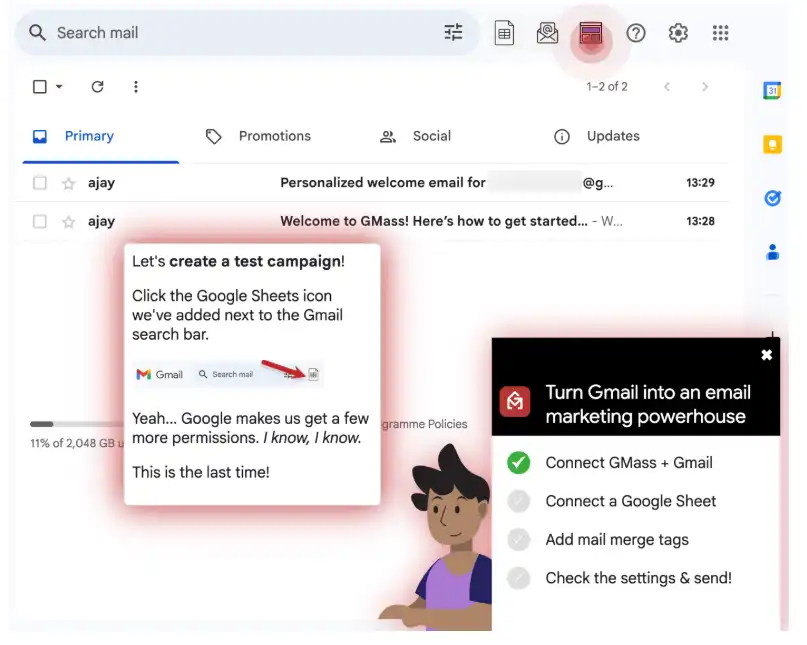
GMass works right inside your Gmail. First, you add the GMass Chrome extension and connect it to your Gmail account. Then you make a Google Sheet with the names and email addresses of creators and influencers. In Gmail, you write one message and link it to that sheet. GMass uses the sheet to enter each person’s details and sends the emails on your behalf. You can see who opened or replied to your messages and set automatic follow-ups, so your Influencer outreach becomes faster and more organized.
Gmass Key Features
Here are some key features that make GMass stand out:
- Works inside your Gmail, so you don’t need a new app or set up
- Uses Google Sheets to fill in names and details
- Sends automatic follow-up emails for you
- Let’s you do A/B tests on an email
- Shows who opened, clicked, or replied
- Helps keep emails out of spam with extra sending tools
Gmass Pros & Cons
When it comes to email outreach tools, GMass offers a user-friendly experience for cold emailing. Here’s a look at the key benefits of using GMass for your outreach campaigns.
Pros
- Very simple setup that walks you through each step
- Easy-to-read dashboard that shows how your emails are doing
- Can send emails through SMTP to help avoid Gmail’s daily limits
- Let your team work together in the same system
- Can connect to other tools through an API
Cons
- Does not have its own email warmup tool
- Does not connect directly to LinkedIn or phone calling
- Needs access to your Gmail and Google Drive to work
Gmass Pricing
GMass is an affordable email outreach software. During the free trial, you can send up to 50 emails per day. Paid plans start at $29.95/month for the Standard tier, $39.95/month for the Premium tier, and $59.95/month for the Professional tier. Team Premium plans begin around $175/month and scale with your number of users.
4- Apollo
Apollo.io helps you find the right people to contact and reach out to them in one place. You can build an email list by applying filters for job title, industry, company size, and location. Then Apollo can locate and verify these business email addresses. After that, you can send an email sequence (your first email plus follow-ups) from the same dashboard.
What makes Apollo one of the best cold email software is that it combines prospecting and outreach. It has a huge B2B database, lets you reach people by email, LinkedIn, or phone, and has an AI assistant that helps you personalize messages and automate simple tasks.
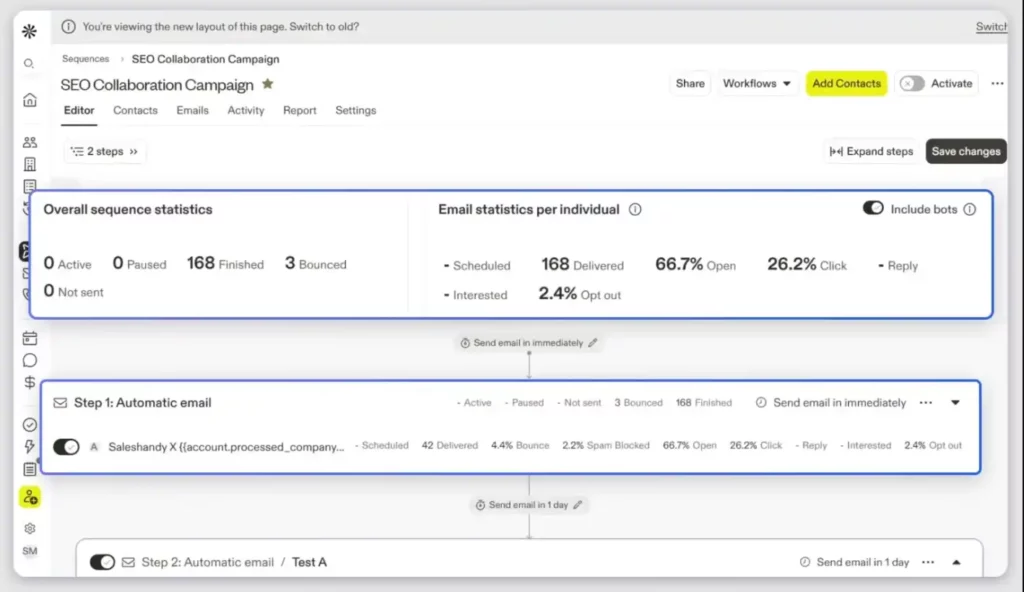
To use Apollo.io:
- Open Contact Search: Set filters like job title, industry, location, and company size.
- Prioritize contacts with verified / likely-to-engage emails to reduce bounces.
- Save prospects: Save the search for reuse, or add selected prospects to a list.
- Add emails in order: write Email 1 + follow-ups (the tool will send them automatically based on your schedule).
- Go to Settings → connect your mailbox.
- Set safe daily sending limits to protect your domain reputation.
- Draft Email 1 + follow-ups. Add A/B subject lines to test what performs best.
- Launch the cold email marketing software at the right time: Start the sequence during business hours to increase your reply rate.
- Track and manage: Monitor replies, handle interested prospects, and move qualified leads into your pipeline/CRM.
Apollo Key Features
- Lead discovery + cold email outreach in one platform
- Sending personalized messaging at scale
- Automated multi-touch sequences (email, LinkedIn, calls)
- Automatic follow-ups (no manual chasing)
- Comprehensive analytics
- CRM integrations (HubSpot, Salesforce, Pipedrive) to sync leads into your pipeline
Apollo Pros & Cons
Here’s a quick overview of Apollo’s advantages and disadvantages.
Pros
- It helps you find leads fast
- Real-time database refresh keeps lead data up to date
- Quick, reliable customer support
- Easy to use with a beginner-friendly interface
- Built-in CRM + deal/lead management in the same platform
Cons
- Some users find auto-renewal and billing policies frustrating at times
- Expensive pricing plans
Apollo Pricing
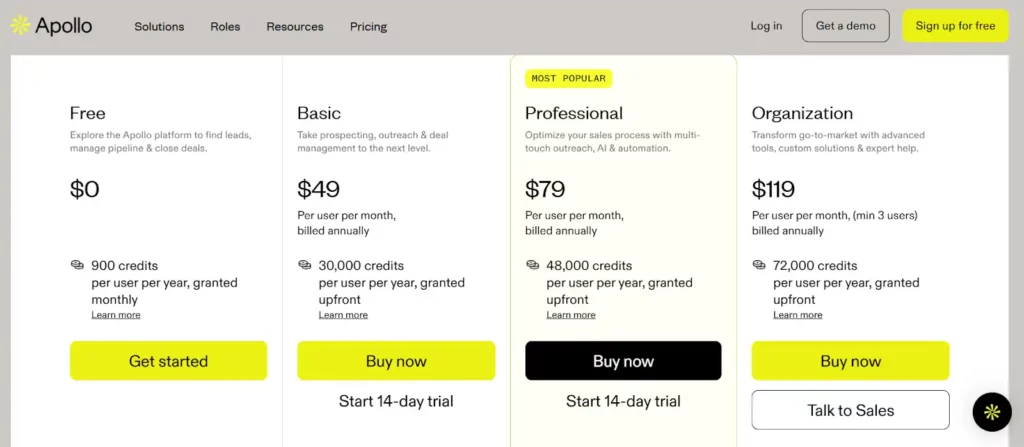
Apollo has a free Starter plan ($0) and paid tiers. On the pricing page, Basic starts at $49/user/month. It uses credits: you spend them to enrich contacts and export data; higher tiers include more credits and features. Trials include limited credits to test a plan. Email campaigns are on every plan, but free accounts only connect to Gmail. Paid plans can connect to Microsoft/other providers for outreach email. Unlimited plans have fair-use caps; you can buy extra credits or ask sales for custom.
5-Lemlist
Lemlist is another top cold email marketing platform that helps teams run personalized, multi-channel cold outreach (email, LinkedIn, WhatsApp, and calls) from a single dashboard. It also supports rich personalization: dynamic text, interactive images, custom landing pages, and video thumbnails, so cold emails look genuinely 1-to-1.
This email outreach software sends automated, personalized cold emails and follow-ups from your own inbox—often seen as the best cold email software for beginners.
- First, create an account.
- Next, connect your sender email service provider.
- Then, go to Campaigns and import leads (CSV or paste emails).
- After that, write your email sequence and choose a sender/template.
- Next, schedule your sending time.
- Finally, review, launch, and track replies/reports; handle follow-ups in Tasks.
Lemlist Key Features
- Search Filters (Find the Right People): Add key details like location, job title, company size, and company name to build a list of leads that match your ideal customer profile.
- Fill in Missing Info (Verified Contacts): Lemlist can add missing details, such as verified email addresses, phone numbers, and company information, before you start reaching out.
- AI Writing Help (Messages That Feel Personal): Use AI to suggest subject lines and email messages for each group of leads.
- Action Triggers (Send at the Right Time): Set messages to send when someone takes an action—such as opening your email, clicking a link, replying, or visiting a page.
- All-in-One Automation (From Leads to Sending): Put lead finding, data cleanup, and sending emails into one simple workflow, so your cold email software runs with less manual work.
Lemlist Pros & Cons
Let’s take a closer look at the key benefits that make Lemlist stand out as powerful cold email software:
Pros
- Feature-rich multichannel outreach: Run cold outreach across email plus channels like phone calls or LinkedIn from one place.
- Built-in lead database + enrichment: Find B2B leads and pull verified contacts faster.
- Native integrations: Connect to popular CRMs and automate workflows via Zapier.
- Strong AI personalization: Draft highly tailored sequences to improve relevance and replies.
- Campaign builder + unified inbox: Build flows visually and manage conversations in a single inbox.
Cons
- Campaign setup and reporting can feel complex for first-time users.
- Costs add up as you scale features and seats
Lemlist Pricing
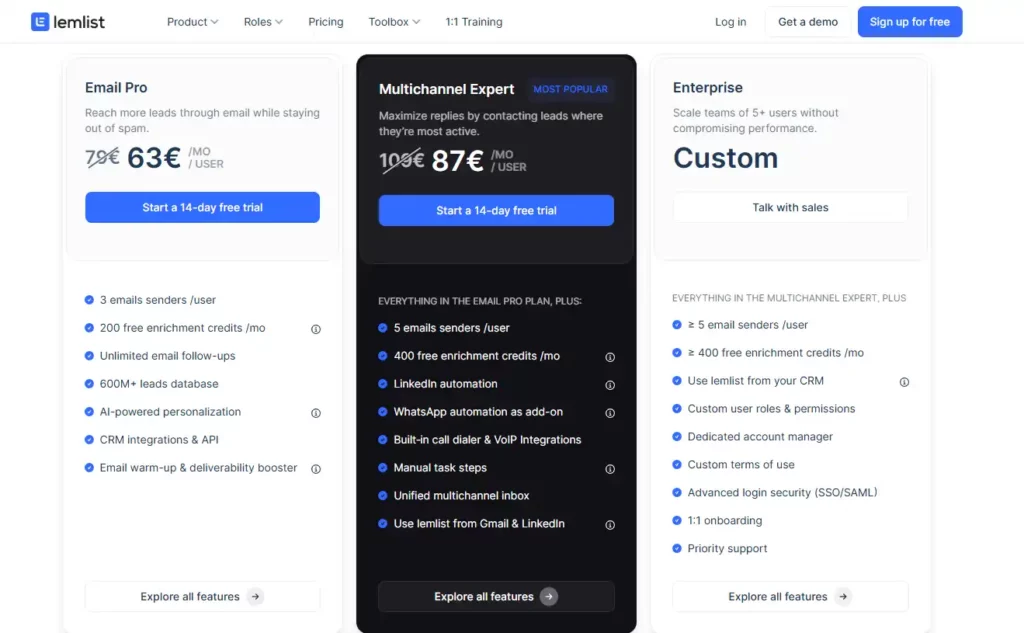
Email Pro is $79/user/month, or $63/user/month billed yearly. Multichannel Expert is $109/month or $87/yearly per user; Enterprise is custom. You get a 14-day free trial plus unlimited campaigns & follow-ups. Warm-up and inbox rotation are included. The 600M+ lead database is included, but enrichment/verification use credits (1k credits = $10, approximately 200 verified emails or 50 phone numbers). Credits are deducted only on successful transactions, and you can recharge at any time. Extra sending email addresses cost $9/month each.
Conclusion
In this list, we compared the best cold email software based on what actually moves revenue. We reviewed the top cold email outreach tools based on key features, including list cleaning, inbox rotation, reply handling, analytics, and the ability to scale automatically without compromising deliverability or budget.
When cold inboxes hit spam walls, brandID’s Bulk Cold Outreach Extension gives a smarter lane—sending your email through websites’ Contact Us forms to reach business owners’ primary inboxes without warm-ups or spam filters. Install the extension now and turn your cold outreach into real conversations.
FAQs
Cold email still matters because it lets you reach lots of people without bothering them in the moment. Prospects can read it when they have time, forward it to a coworker, or save it for later—so it works well when buying decisions take weeks or months. You can also see who opened, clicked, or replied, and use the data to improve your next cold email campaigns. With well-targeted leads, personal messages, and follow-ups, it can keep your sales pipeline moving.
For influencers, brandID’s Bulk Cold Outreach extension is the best AI tool for reaching brands at scale. It auto‑finds contact forms on business websites, personalizes your pitch, solves CAPTCHA, and can submit nearly 10k+ messages/day in the site’s language—straight to the brand’s primary inbox or CRM (not spam). Additionally, its pay‑per‑success monetization model keeps costs tight and helps you secure collabs faster.
brandID’s Bulk Cold Outreach Extension automatically sends personalized messages through each brand’s website contact form—at scale. So messages reach key business owners’ main inbox without spam battles, warm-ups, or domain rotation. The extension’s AI form detection and CAPTCHA solver can scale to over 10K contact form submissions per day with a single click, improving deliverability and conversion rates.