

TikTok’s Profile View History is the feature that logs who visited your profile over the last 30 days. It is also one of the few places on the app where the tracking cuts both ways: once you can see your Viewers list, everyone you visit can also see yours.
Profile View History sits alongside the other visibility signals creators manage on TikTok, from reach suppression during a TikTok shadowban through to how your reposts surface in other feeds. Each toggle changes what strangers see when they land on your profile, and none of them permanently damage the account.
Below is the exact three-tap sequence to flip Profile View History off, the eligibility rules that keep the toggle from appearing at all, and the little-known trick for browsing another account anonymously without leaving a footprint.
Key Takeaways
- TikTok profile views are tracked for 30 days: and anyone with the feature on can see the usernames of accounts that visited them during that window.
- Profile view history is a mutual setting on TikTok: which means turning your Viewers list off also hides your username from everyone else’s lists.
- TikTok profile view history eligibility is limited: to accounts set to Personal (not Business), 16 or older, and in regions where the feature has rolled out.
- Hiding TikTok profile views takes three taps: under Settings and Privacy, then Privacy, then Profile Views, with no confirmation screen and instant effect.
- TikTok profile view history has no desktop toggle: so the setting lives only inside the mobile app, even though the Viewers list itself is sometimes visible on the website.
What Is Profile View History on TikTok
Profile View History is TikTok’s name for the feature that logs who visited your profile over the trailing 30 days. When the feature is on, a Viewers icon appears at the top of your profile page, and tapping it opens a scrollable list of the accounts that stopped by, sorted by most recent visit. The list refreshes in real time, caps at 30 days of history, and does not count visits from blocked accounts, your own device, or users who have the feature switched off themselves.
TikTok rolled the feature out globally in early 2023 as a privacy-forward alternative to the always-on view counters some platforms use. The design decision is the one most how-to posts gloss over: TikTok built it as a mutual system. If you want to see who is viewing you, you have to let others see when you view them. There is no asymmetric mode, no premium tier that lifts the mutual rule, and no in-app workaround that leaves one side on and the other off.
Who Can Use TikTok Profile Views
The toggle appears in Settings only when four conditions all line up on your account. If any one of them is missing, Profile Views simply will not show in the Privacy menu, which is the most common reason people assume the feature has been removed.
- Your account is set to Personal, not Business. Business accounts never see Profile Views. Switch under Settings, Account, Switch to Personal Account.
- You are 16 years or older. TikTok reads the age from the birthday on your account; younger accounts have the feature permanently hidden by design.
- Your region supports the feature. Profile View History is global as of 2026, but a small number of markets still receive it on a staged rollout and may not yet have the toggle.
- You have the latest app version installed. Older builds pre-Jan 2023 hide the Privacy row entirely; update from the App Store or Google Play if the row is missing.
How to Turn Off Profile Views on TikTok Step by Step
The whole flow takes under a minute from inside the TikTok app on either iOS or Android. There is no confirmation screen; the switch flips instantly and both lists update the moment the toggle changes state.
Step 1: Open Your Profile Tab
Launch TikTok and tap Profile in the bottom-right corner. Your profile page loads with your username, bio, follower counts, and (if the feature is currently on) a small eye-shaped Viewers icon in the top-right area above your bio.
Step 2: Open the Hamburger Menu
Tap the three-line menu icon in the top-right corner. The menu drawer slides in from the right with Settings and Privacy at the top of the list.
Step 3: Choose Settings and Privacy
Tap Settings and Privacy. The menu that opens has roughly a dozen rows grouped under Account, Content, Cache, Support, and Login. The row you need is Privacy, under the Account group.
Step 4: Open Privacy
Tap Privacy. A long list of privacy toggles opens, covering Discoverability, Download, Comments, Mentions, Direct Messages, and more. Scroll until you see the row labelled Profile Views, which is usually around a third of the way down.
Step 5: Tap Profile Views
Tap Profile Views. A dedicated page opens with a single toggle labelled Profile View History, a one-sentence explanation of the mutual rule, and a link to TikTok’s help article.
Step 6: Flip the Toggle Off
Tap the Profile View History toggle so it moves from the on (coloured) state to the off (grey) state. The change is instant: the Viewers icon disappears from your profile within a second, and your username stops appearing on other users’ lists the moment they refresh.
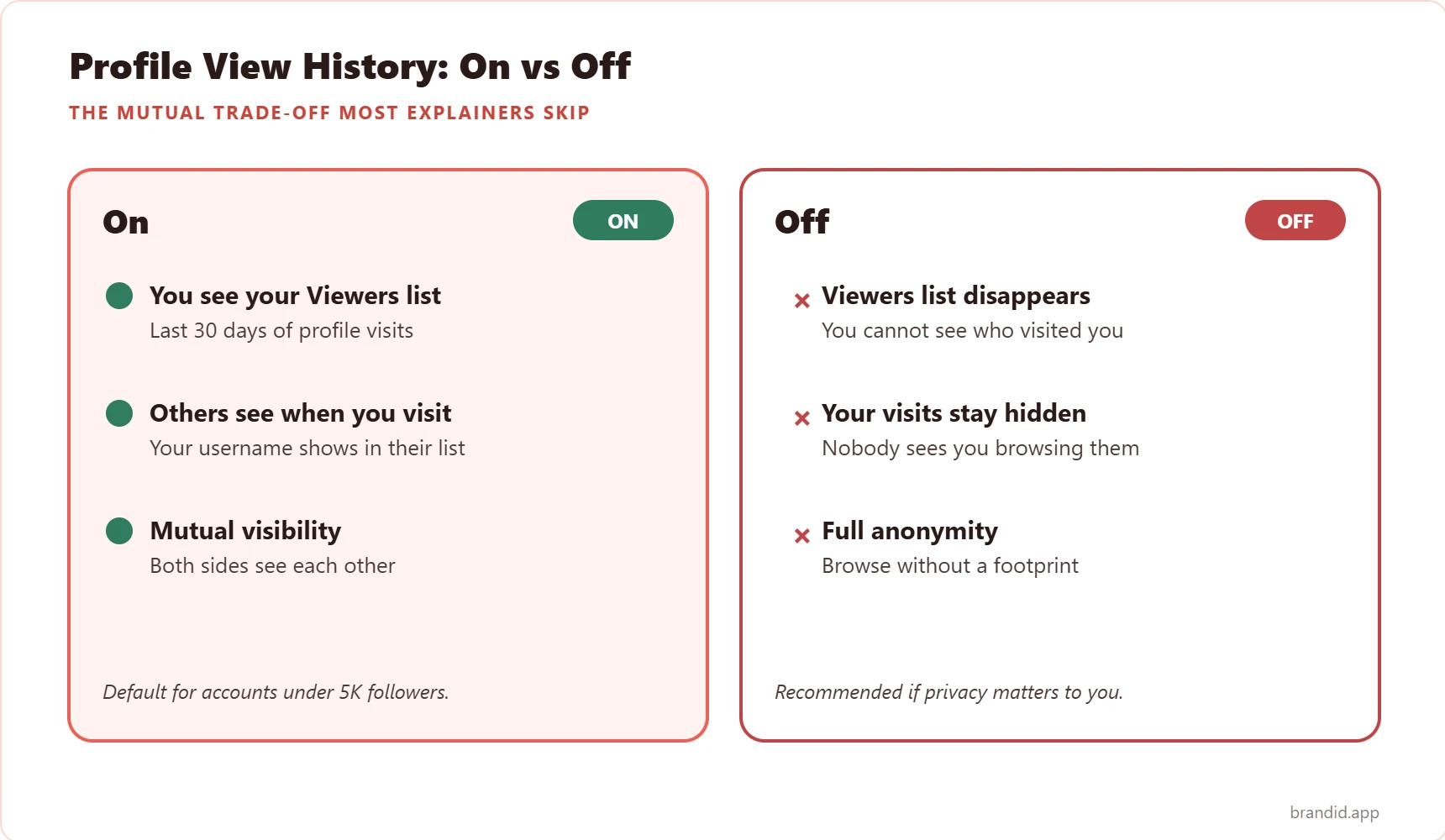
What Happens When You Turn Profile Views Off
Flipping Profile View History off changes four things at once. All four are reversible and update in real time; nothing takes effect only after a reboot or a reload.
Your Viewers List Disappears
The eye icon at the top of your profile vanishes within one app refresh. Any 30-day visit history that was already logged is retained in TikTok’s backend, but you lose read access to it until the toggle is flipped back on.
Your Username Stops Showing Up Elsewhere
The mutual rule kicks in immediately: your name is removed from the Viewers list of every account you visited in the last 30 days. This is the privacy upside most people are chasing when they look up how to turn off profile views on TikTok in the first place.
Analytics Are Not Affected
Creator analytics (profile views count, video views, follower growth, average watch time) all keep updating normally. Profile View History is a social discovery feature, not a performance metric; the Viewers list is a different data stream from the raw visitor count TikTok shows under Creator Tools.
Blocked and Removed Accounts Stay Blocked
Turning Profile Views off does nothing to blocked accounts, hidden followers, restricted comment lists, or any other privacy setting. Those sit under separate toggles in the same Privacy menu, and flipping Profile Views has no spill-over effect on any of them.
How to View Someone’s Profile Anonymously on TikTok
The mutual rule is what makes anonymous viewing possible in the first place. The exact sequence is to turn Profile View History off first, then visit the profiles you want to browse. Any visit logged with the feature on will still show up on the other person’s list for 30 days, so the switch has to happen before the visit, not after.
- Turn Profile View History off under Settings and Privacy, Privacy, Profile Views.
- Wait 30 seconds for the setting to propagate across TikTok’s edge servers so the next visit is read as anonymous.
- Visit the profile you want to browse. Your username does not appear in their Viewers list, and no notification is sent.
- Leave the setting off for the browsing session. Flipping it back on during the session re-exposes the current session’s visit if the other side is still looking.
Why TikTok Built Profile Views as a Mutual Setting
The mutual rule is a deliberate design choice. Instagram tried a one-way viewer-count feature in 2021 and shelved it after a wave of complaints that creators felt surveilled by followers who had no equivalent exposure. TikTok’s engineering team cited that episode directly when the Profile Views feature launched, framing the mutual rule as a privacy symmetry: the only accounts that can see your visits are the ones you can also see visiting them.
In practice the design works. The feature has not generated the same creator backlash that other platforms’ viewer counters have, and the two-way opt-in rule means anyone uncomfortable with the exposure has a clean one-tap way out that also removes their own footprint across the app.
Profile Views on Desktop vs Mobile
The toggle only lives inside the mobile app, but the Viewers list itself is partially visible on the website. The split is specific enough that it is worth putting side by side.
| Surface | Mobile App (iOS + Android) | Desktop Browser (tiktok.com) |
|---|---|---|
| Profile Views toggle | Available in Settings and Privacy, Privacy, Profile Views | Not available |
| Viewers list visible | Yes, when feature is on | Yes, limited to top 10 recent visitors |
| See when others visit you | Yes, when feature is on | Yes, with the same mutual rule |
| Change setting from this surface | Yes | No, must open mobile app |
| 30-day visit history | Yes | Yes, when feature is on |
Optimize Your TikTok Profile Beyond Views
Privacy settings matter, but the single lever that moves more subscribers and clicks on TikTok than Profile Views ever will is the one link in your bio. Every follower who taps your profile sees that URL first; everything else, including the Viewers list, is secondary.
brandID is built for exactly this. The free plan ships with unlimited links, a custom URL at brandid.app/yourname, click analytics for every link, built-in affiliate shop blocks, and a theme editor that matches your TikTok profile picture and bio colors. Creators plug in their TikTok bio URL once and route every visitor to a hub they fully control, whether their Profile View History is on or off. If your current link-in-bio play is a half-finished Linktree or a dead URL, that is doing more damage to your growth than the Viewers tab ever could.
Bottom Line
Turning off profile views on TikTok is a three-tap flow buried under Settings and Privacy, then Privacy, then Profile Views, and the switch is reversible at any time with no cooldown. The one thing the rest of the internet gets wrong about this feature is the mutual rule: flipping Profile View History off removes your Viewers list, but it also wipes your username from everyone else’s list, which is actually the privacy win most people are chasing in the first place. Beyond the toggle, the two levers that move subscribers and clicks on TikTok sit elsewhere, including your bio link, your post cadence, and whether you have found your lane in formats like TikTok reposts or any of the newer monetization surfaces covered under paid routes creators now use on TikTok.
FAQs
How do I turn off profile views on TikTok?
If I turn off profile views, can I still see who viewed my profile?
Does TikTok tell someone if I turn off profile views after visiting them?
Can I view someone’s TikTok profile anonymously?
Why is the Profile Views option missing from my TikTok Privacy menu?
Can I turn off profile views on TikTok from a desktop browser?
Does turning off profile views affect my follower count or video views?
How long does TikTok keep profile view history?
Can business accounts see who viewed their TikTok profile?
Will TikTok show my profile views to strangers who do not follow me?
Does TikTok charge for profile view history?
 Summarize this article with:









